Lenovo's new Yoga 920 2-in-1 laptop Review
Choosing the right laptop for your needs can be a daunting task.
There are hundreds of models to choose from ranging from powerful and
not very portable gaming laptops, all the way down to ultraportable
mobile workstations, and everything else in between. Today we're taking a
look at Lenovo's new Yoga 920 2-in-1 laptop.
With a 14" foldable display, an 8th-gen Intel Core i7 processor, and a premium-looking design, the 920 is aimed at business professionals and mobile users who want a sleek laptop that can always keep up with them. As a direct upgrade to the Yoga 910, the Yoga 920 adds Thunderbolt 3, an improved touchpad and active pen, longer battery life, and better thermal management.
The laptop features an all-metal, unibody design. It's smooth and simple with straight lines and gently rounded edges. At about 3 pounds, it's marginally heavier than some other models in this range but can still be easily carried around all day without too much effort. The professional industrial design makes it perfect for use in the board room, too.

The model we received for review features a bronze coloring, but the Yoga 920 is also available in a platinum silver finish.
I can tell some considerable design work went into the keyboard. The full metal design helps the 920 keep its rigidity and not flex while typing. Considering the thickness of the laptop, the keys aren't terrible but they do have a shallow travel distance. Some may find them a bit too mushy, but overall I think Lenovo did a good job here.
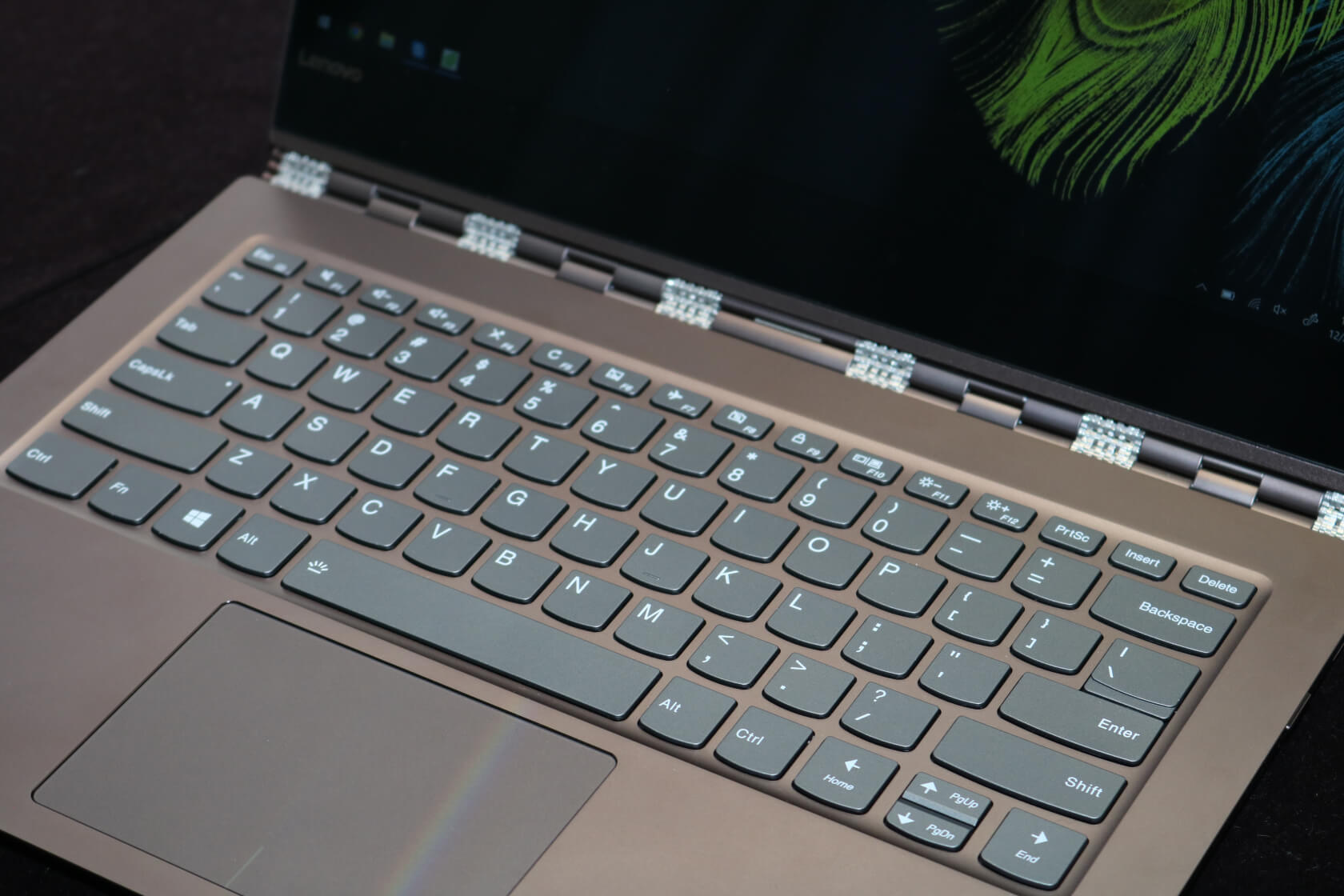
Despite the ultra short travel distance, the Yoga is able to offer a good typing experience. Looking at the keyboard layout, there aren't many sins to take off points for. You get full-sized enter and backspace keys, a function key, and right alt and control keys as well. The up and down arrow keys are condensed but I'm indifferent about this. One possible solution could be to shorten the right shift key to make room for full-sized up and down arrow keys. Another small inconvenience is that page up and down don't have their own dedicated keys but print screen and insert do. I think a far better implementation would have page up and down mapped at the top to their own keys and then print screen and insert mapped as secondary functions.
The trackpad is also very nice. Too often laptop manufacturers make the trackpads needlessly small, but that is not the case here. The trackpad has good palm and thumb rejection if you rest it on the left click. Multi-finger gestures are smooth and natural feeling as well. While it's not quite at MacBook level, it's about as good as you can get. The front fingerprint sensor is a nice touch, too.
With Windows Hello, it's not quite as fast as a modern smartphone
sensor, but it still gets the job done. I found I was using this more
than I was typing my password to log in. The Yoga 920 also has far-field
microphones with a 20 foot range for those avid Cortana users.
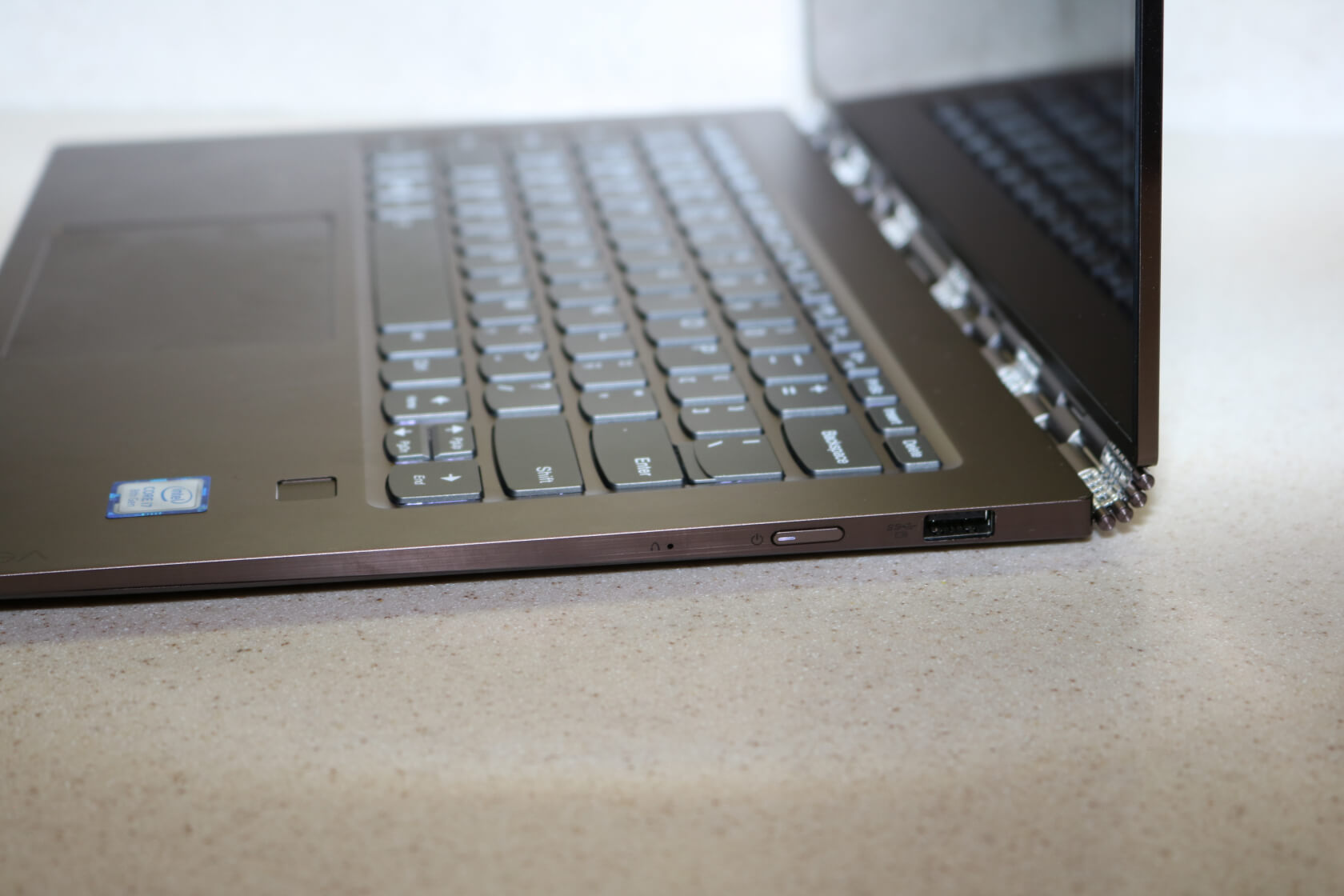
There isn't much room for I/O on a laptop of this class but I think Lenovo did a good job with it. The left side has dual USB-C Thunderbolt ports and a headphone/mic combo jack. Unfortunately the included USB-C charger only works on one of the ports. The right side has the power button and a full sized USB 3 Type A port with always-on charging. They may have been able to fit an extra USB port or possibly even an HDMI port, but overall it's good port selection.
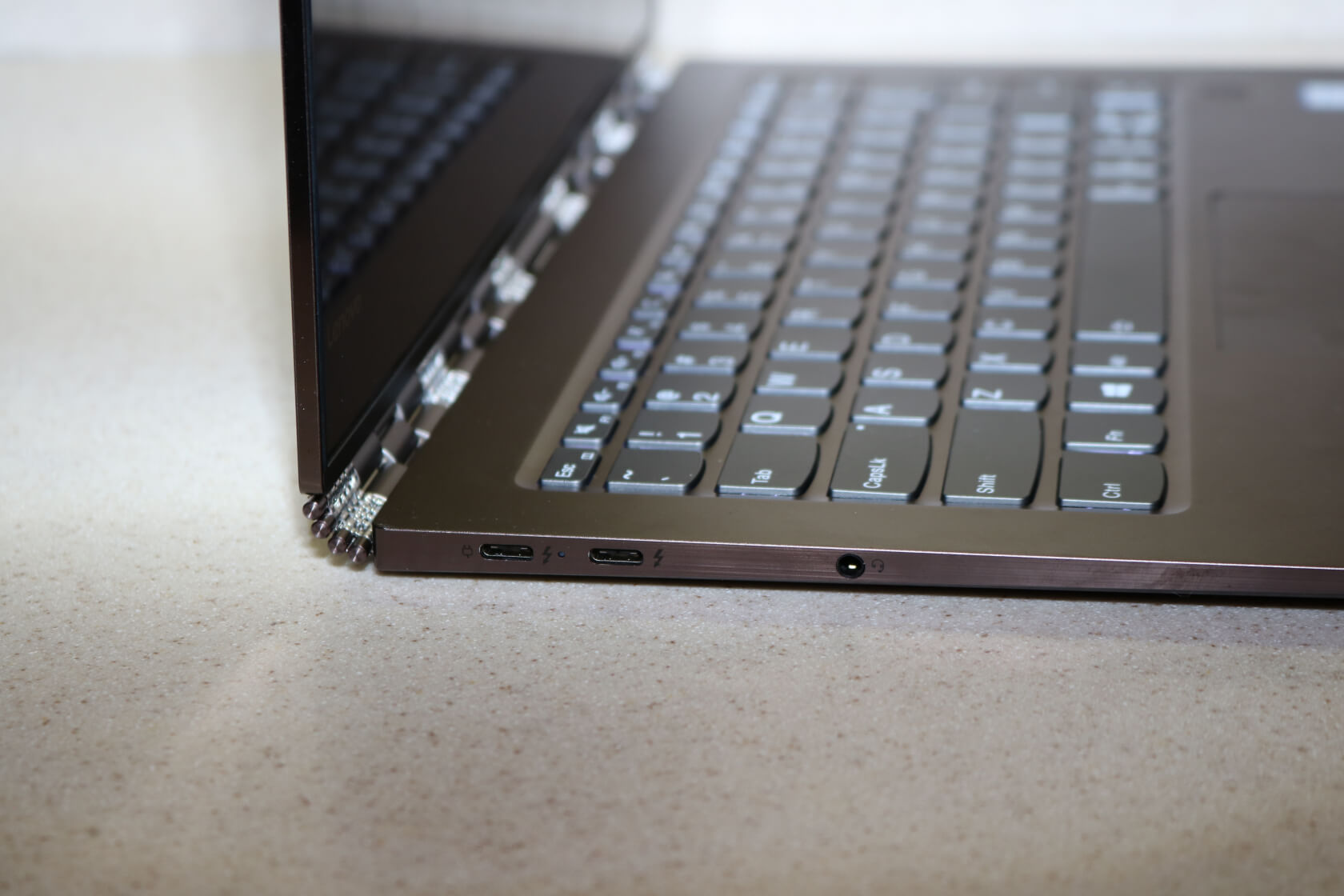
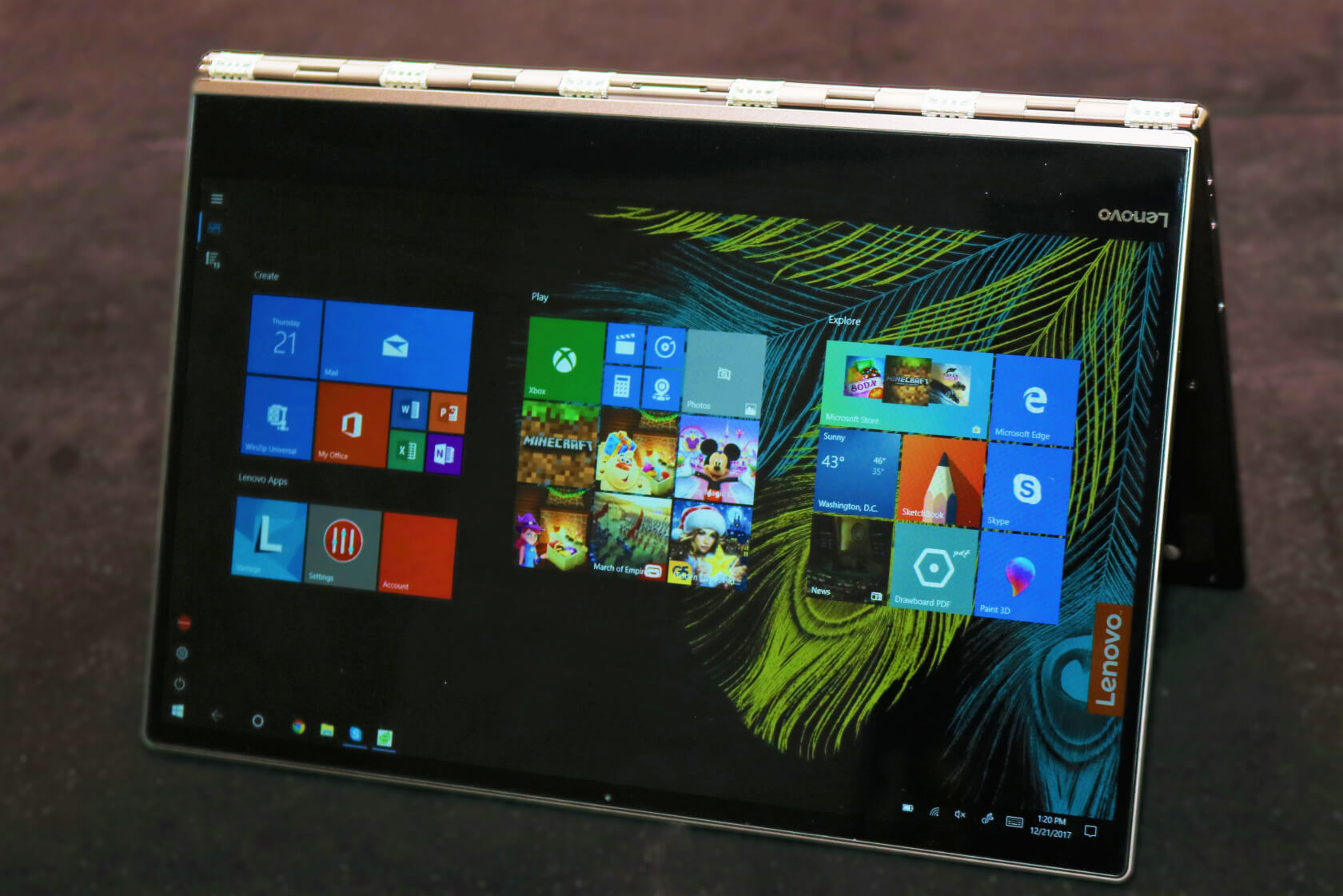
Moving on to one of the Yoga 920's best features: the hinge. At first glance, it reminded me of the mechanics found in a premium metal watchband. The motion is extremely fluid and the mechanism allows the laptop to be folded full 360 degrees around to the back. The power and data for the screen travel through a small ribbon cable concealed in the center of the hinge. Folding it back and forth from tablet to laptop mode is very satisfying. I did find that opening the lid from a closed position required a little more force than it should have. This reflects a slight over-tensioning in the hinge but it's nothing you can't get used to.
The display on the 920 is solid as well. While it's not designed for color-accurate work, viewing angles are great. The screen gets very bright but I found the lower levels of brightness to be inadequate. There are about 10 levels of brightness and I typically stayed around the middle. The lowest level is completely off but the next 3 levels appear nearly identical to each other. There is no good setting for use in a dark room or when you don't want someone looking over your shoulder. It's hard to tell if this is an issue with Windows or Lenovo's screen but either way, there is definitely some room for improvement.
The Yoga 920 is also available with a 4K screen but I am plenty happy with the 1080p model. On a 14" screen, I feel the difference is negligible and not worth the extra price and battery drain for most. Unless your applications require the higher resolution, the 1080p variant should be just fine. Both models are touchscreens, so that isn't a factor.
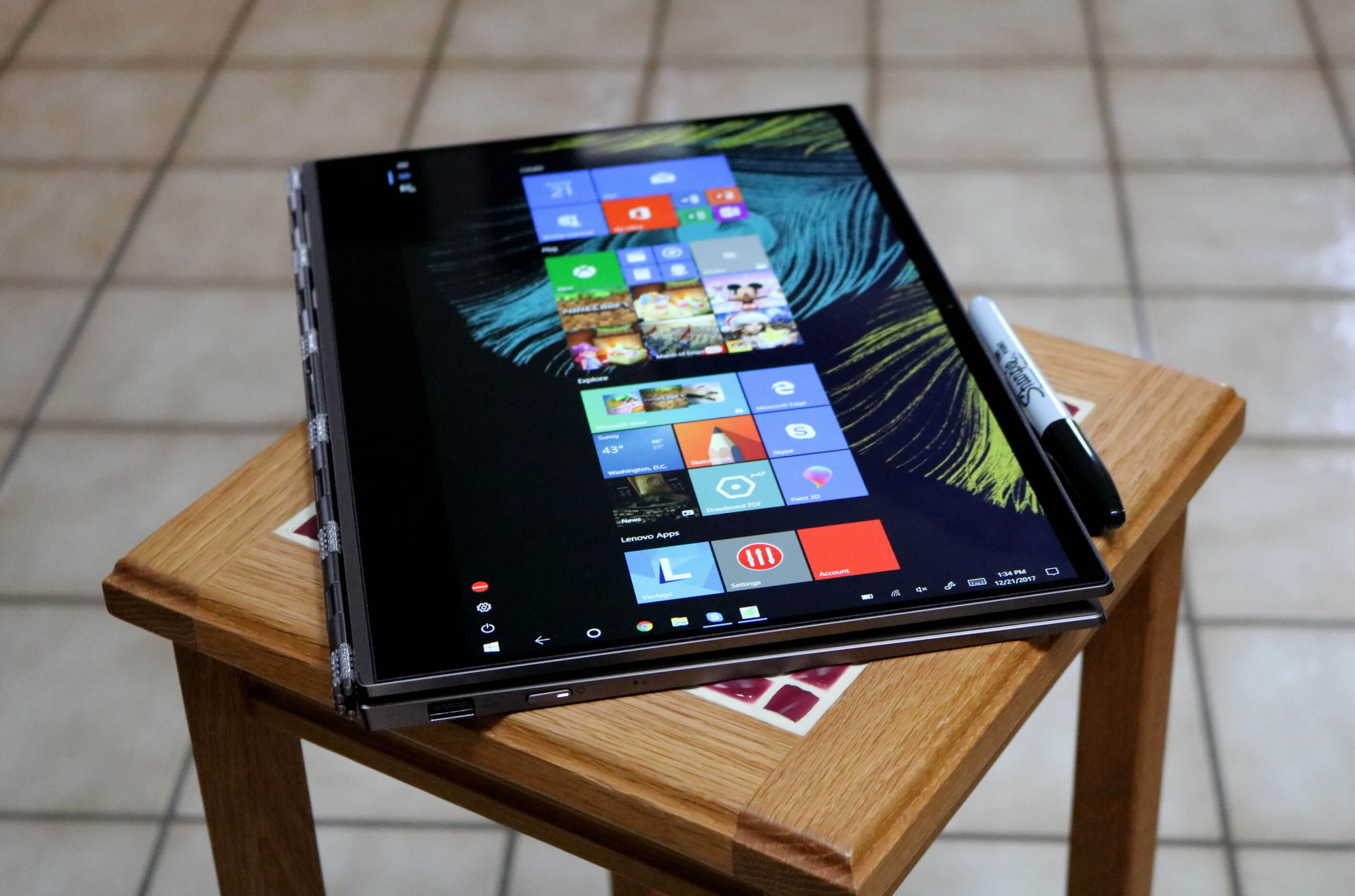
Once folded into tablet mode, the Yoga 920 is only a hair thicker than a marker. Holding it from the back where the keys are can be a little uncomfortable but they automatically disable so you don't have to worry about pressing them.
When you are in tablet mode, you'll find the included active pen very useful. It takes a single AAAA battery and makes the input experience much nicer. There are two thumb buttons as well as a button on the top of the pen where an eraser would be. The only problem with this pen is finding a place to store it when you aren't using it.
Lenovo does include a small plastic mount that fits in the USB 3 Type A port, but this means you can't use that port at all then which may be an issue depending on your peripherals.
Opening up the laptop is fairly straightforward with a standard set of precision Torx bits. The bottom is a single piece of metal and helps act as a heatsink to keep the laptop cool. Once inside, you'll notice the monster 70 Watt battery. It takes up about 2/3 of the space inside the casing. On either side of the battery we find the two down-firing speakers. For a laptop this size, they stay clear and get surprisingly loud. While they're not perfect, they are definitely some of the best laptop speakers I've ever heard.
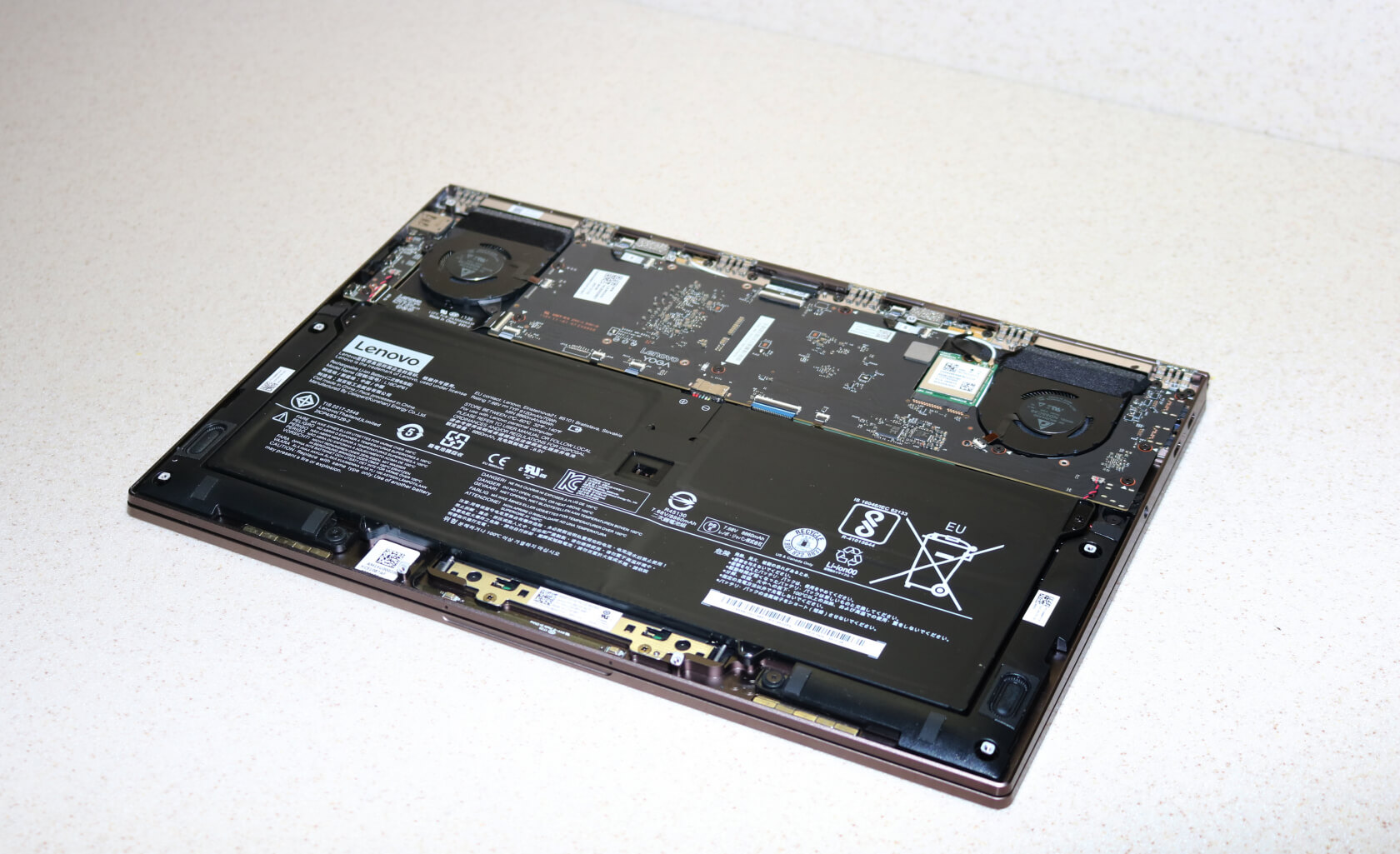
Under full load, the bottom of the laptop got warm to the touch but the keyboard and touchpad stayed relatively cool. This is in part due to the all-metal construction that helps move the heat out of the laptop and away from your hands. There are two small exhaust fans at the top which blow out directly behind the laptop through the hinge. This means that even when the 920 is folded or resting on a flat surface, the heat can still get out.
During load tests, the Yoga maintained a stable average temperature
of 72 degrees across all cores. There were some jumps up to 85-90
degrees at first but the i7-8550U quickly throttled down to 1.9GHz.
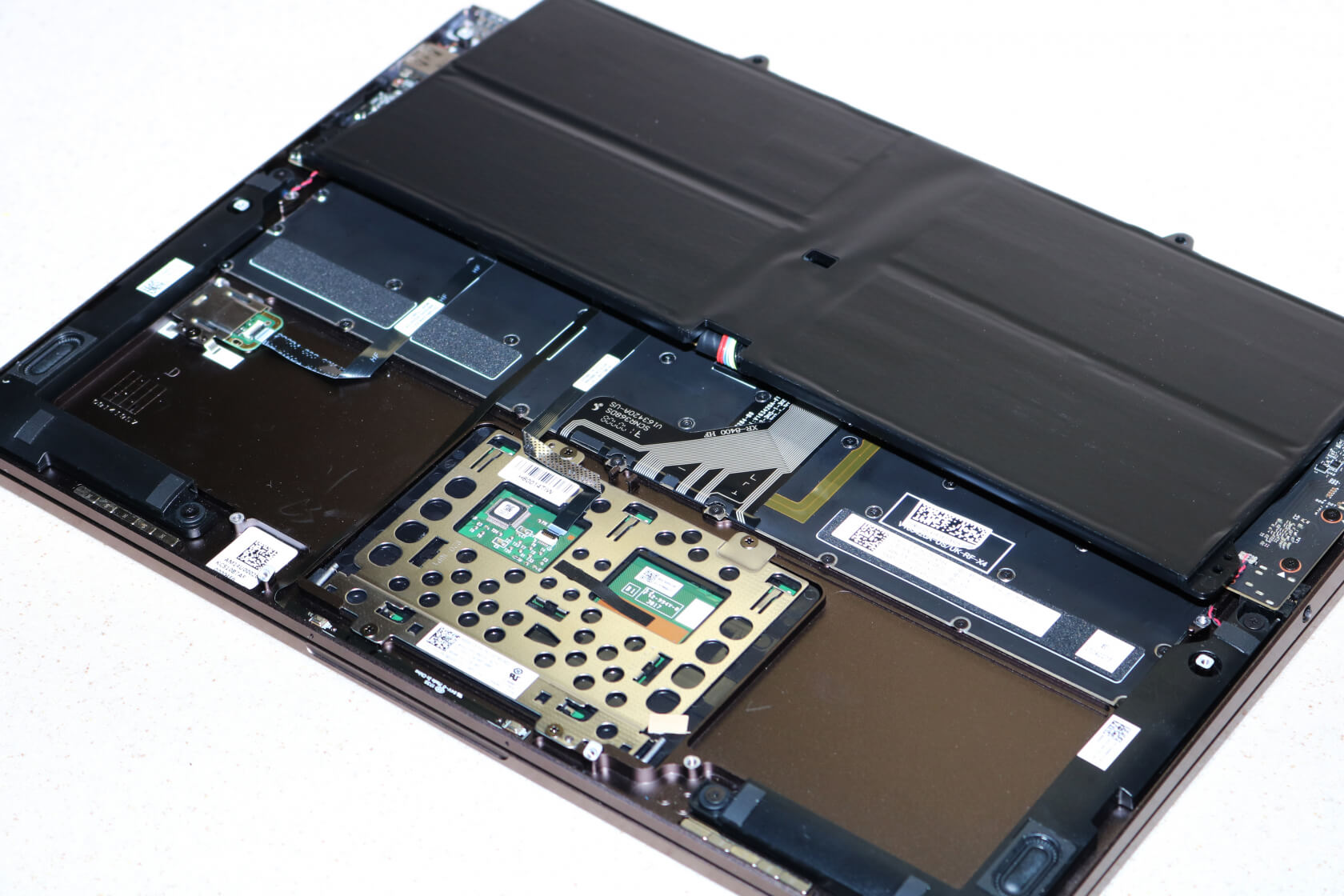
Besides the trackpad circuitry, there's not much under the battery either. The only easily accessible component is the wireless adapter; something a user would rarely even bother changing. If you want to get at the M.2 drive, you'll have to completely disassemble the laptop because it's located beneath the motherboard. The RAM is also soldered in so you may want to be generous and think towards the future when selecting your configuration.
With the massive 70WH battery, the 920 excelled with an impressive 8.61 hour battery life in our web browsing test.

Next we take a look at the brand new 8th generation Intel Core i7 8550U processor. It's a 4C/8T CPU with a turbo frequency of up to 4GHz and it does all this while using just 15W. Our x264 and WinRAR benchmarks are designed to pin the CPU to measure both single and multi-core performance across different processors.
As expected, the Yoga 920 comes out on top. WinRAR shows single-core performance has increased slightly from the competition. Multi-threaded performance is a totally different story with the Yoga 920 coming in at 65% higher performance than our previous top contender.
The x264 benchmark shows another large gain but not quite as much. Overall the Yoga 920's CPU puts up great numbers for short burst tasks. Longer, more sustained loads may slow due to throttling, but that is to be expected.


The Samsung SSD is a great storage option and although write speeds are slightly slower than the HP Spectre 360, the Yoga 920 dominates in read performance. For random reads and write, the 920 falls to third place in our roundup. This result will likely only matter to those with highly specialized, storage-heavy loads.


On to the RAM now where the 920 is situated right in the middle of the pack. I would have expected it to have done better here. Although I don't have the model to test, I would guess the higher-end configurations with 16GB of RAM to put up better results.

The Futuremark PCMark8 benchmarks simulate typical use cases for office work, content creation, and home use. The 920 leads our charts in the Work Suite test but falls to fourth place in the Creative Suite test and second place in the Home Suite. This may be caused by excessive throttling and limited RAM. The 920 isn't necessarily designed a workstation-class laptop so despite the high price tag, you shouldn't expect game-changing performance out it.


In our 3DMark tests, the Yoga 920 did well for what we're used to see from Intel integrated graphics. This is a graphics-heavy test, so it's not at all surprising that the Surface Book pulls ahead with its (modest yet dedicated) GTX 940 GPU while the Yoga 920 is using onboard Intel 620 graphics. What is surprising is that the 920 beats the Surface Book in the Cloud Gate Test.
Compared to the new Ryzen APUs that we tested recently, Intel's integrated graphics lag way behind though (8011 score in Sky Diver, 11832 in Cloud Gate).


Lenovo's Windows installation comes with a few programs that you should uninstall, but overall it's not too bloaty. Bootup and login times are fast thanks to the SSD and fingerprint sensor.
That about wraps it up. Starting at $1,200, Lenovo's Yoga 920 2-in-1 is not the most affordable ultraportable you will find, but you certainly get what you pay for. The all-metal exterior makes the laptop feel premium on the outside and the internal component selection makes it premium on the inside as well. Although it feels one notch too tight for me, the hinge system is truly the best that money can buy right now. If you're in the market for an ultrabook or 2-in-1 device, it's hard to go wrong with the Yoga 920.
With a 14" foldable display, an 8th-gen Intel Core i7 processor, and a premium-looking design, the 920 is aimed at business professionals and mobile users who want a sleek laptop that can always keep up with them. As a direct upgrade to the Yoga 910, the Yoga 920 adds Thunderbolt 3, an improved touchpad and active pen, longer battery life, and better thermal management.
The laptop features an all-metal, unibody design. It's smooth and simple with straight lines and gently rounded edges. At about 3 pounds, it's marginally heavier than some other models in this range but can still be easily carried around all day without too much effort. The professional industrial design makes it perfect for use in the board room, too.
The model we received for review features a bronze coloring, but the Yoga 920 is also available in a platinum silver finish.
I can tell some considerable design work went into the keyboard. The full metal design helps the 920 keep its rigidity and not flex while typing. Considering the thickness of the laptop, the keys aren't terrible but they do have a shallow travel distance. Some may find them a bit too mushy, but overall I think Lenovo did a good job here.
Despite the ultra short travel distance, the Yoga is able to offer a good typing experience. Looking at the keyboard layout, there aren't many sins to take off points for. You get full-sized enter and backspace keys, a function key, and right alt and control keys as well. The up and down arrow keys are condensed but I'm indifferent about this. One possible solution could be to shorten the right shift key to make room for full-sized up and down arrow keys. Another small inconvenience is that page up and down don't have their own dedicated keys but print screen and insert do. I think a far better implementation would have page up and down mapped at the top to their own keys and then print screen and insert mapped as secondary functions.
The trackpad is also very nice. Too often laptop manufacturers make the trackpads needlessly small, but that is not the case here. The trackpad has good palm and thumb rejection if you rest it on the left click. Multi-finger gestures are smooth and natural feeling as well. While it's not quite at MacBook level, it's about as good as you can get. The front fingerprint sensor is a nice touch, too.
There isn't much room for I/O on a laptop of this class but I think Lenovo did a good job with it. The left side has dual USB-C Thunderbolt ports and a headphone/mic combo jack. Unfortunately the included USB-C charger only works on one of the ports. The right side has the power button and a full sized USB 3 Type A port with always-on charging. They may have been able to fit an extra USB port or possibly even an HDMI port, but overall it's good port selection.
Moving on to one of the Yoga 920's best features: the hinge. At first glance, it reminded me of the mechanics found in a premium metal watchband. The motion is extremely fluid and the mechanism allows the laptop to be folded full 360 degrees around to the back. The power and data for the screen travel through a small ribbon cable concealed in the center of the hinge. Folding it back and forth from tablet to laptop mode is very satisfying. I did find that opening the lid from a closed position required a little more force than it should have. This reflects a slight over-tensioning in the hinge but it's nothing you can't get used to.
The display on the 920 is solid as well. While it's not designed for color-accurate work, viewing angles are great. The screen gets very bright but I found the lower levels of brightness to be inadequate. There are about 10 levels of brightness and I typically stayed around the middle. The lowest level is completely off but the next 3 levels appear nearly identical to each other. There is no good setting for use in a dark room or when you don't want someone looking over your shoulder. It's hard to tell if this is an issue with Windows or Lenovo's screen but either way, there is definitely some room for improvement.
The Yoga 920 is also available with a 4K screen but I am plenty happy with the 1080p model. On a 14" screen, I feel the difference is negligible and not worth the extra price and battery drain for most. Unless your applications require the higher resolution, the 1080p variant should be just fine. Both models are touchscreens, so that isn't a factor.
Once folded into tablet mode, the Yoga 920 is only a hair thicker than a marker. Holding it from the back where the keys are can be a little uncomfortable but they automatically disable so you don't have to worry about pressing them.
When you are in tablet mode, you'll find the included active pen very useful. It takes a single AAAA battery and makes the input experience much nicer. There are two thumb buttons as well as a button on the top of the pen where an eraser would be. The only problem with this pen is finding a place to store it when you aren't using it.
Lenovo does include a small plastic mount that fits in the USB 3 Type A port, but this means you can't use that port at all then which may be an issue depending on your peripherals.
Opening up the laptop is fairly straightforward with a standard set of precision Torx bits. The bottom is a single piece of metal and helps act as a heatsink to keep the laptop cool. Once inside, you'll notice the monster 70 Watt battery. It takes up about 2/3 of the space inside the casing. On either side of the battery we find the two down-firing speakers. For a laptop this size, they stay clear and get surprisingly loud. While they're not perfect, they are definitely some of the best laptop speakers I've ever heard.
Under full load, the bottom of the laptop got warm to the touch but the keyboard and touchpad stayed relatively cool. This is in part due to the all-metal construction that helps move the heat out of the laptop and away from your hands. There are two small exhaust fans at the top which blow out directly behind the laptop through the hinge. This means that even when the 920 is folded or resting on a flat surface, the heat can still get out.
Besides the trackpad circuitry, there's not much under the battery either. The only easily accessible component is the wireless adapter; something a user would rarely even bother changing. If you want to get at the M.2 drive, you'll have to completely disassemble the laptop because it's located beneath the motherboard. The RAM is also soldered in so you may want to be generous and think towards the future when selecting your configuration.
System Performance and Conclusions
Moving on to system performance and benchmarks, our review unit came equipped with a Core i7-8550U, 8GB of RAM, and a 256GB SSD. The Yoga 920 can also be configured with an i5-8250U, up to 16GB of RAM, up to a 1TB SSD, and a 4k display. Considering this is a workplace and on-the-go focused laptop, battery life is one of the most important metrics.With the massive 70WH battery, the 920 excelled with an impressive 8.61 hour battery life in our web browsing test.
Next we take a look at the brand new 8th generation Intel Core i7 8550U processor. It's a 4C/8T CPU with a turbo frequency of up to 4GHz and it does all this while using just 15W. Our x264 and WinRAR benchmarks are designed to pin the CPU to measure both single and multi-core performance across different processors.
As expected, the Yoga 920 comes out on top. WinRAR shows single-core performance has increased slightly from the competition. Multi-threaded performance is a totally different story with the Yoga 920 coming in at 65% higher performance than our previous top contender.
The x264 benchmark shows another large gain but not quite as much. Overall the Yoga 920's CPU puts up great numbers for short burst tasks. Longer, more sustained loads may slow due to throttling, but that is to be expected.
The Samsung SSD is a great storage option and although write speeds are slightly slower than the HP Spectre 360, the Yoga 920 dominates in read performance. For random reads and write, the 920 falls to third place in our roundup. This result will likely only matter to those with highly specialized, storage-heavy loads.
On to the RAM now where the 920 is situated right in the middle of the pack. I would have expected it to have done better here. Although I don't have the model to test, I would guess the higher-end configurations with 16GB of RAM to put up better results.
The Futuremark PCMark8 benchmarks simulate typical use cases for office work, content creation, and home use. The 920 leads our charts in the Work Suite test but falls to fourth place in the Creative Suite test and second place in the Home Suite. This may be caused by excessive throttling and limited RAM. The 920 isn't necessarily designed a workstation-class laptop so despite the high price tag, you shouldn't expect game-changing performance out it.
In our 3DMark tests, the Yoga 920 did well for what we're used to see from Intel integrated graphics. This is a graphics-heavy test, so it's not at all surprising that the Surface Book pulls ahead with its (modest yet dedicated) GTX 940 GPU while the Yoga 920 is using onboard Intel 620 graphics. What is surprising is that the 920 beats the Surface Book in the Cloud Gate Test.
Compared to the new Ryzen APUs that we tested recently, Intel's integrated graphics lag way behind though (8011 score in Sky Diver, 11832 in Cloud Gate).
Lenovo's Windows installation comes with a few programs that you should uninstall, but overall it's not too bloaty. Bootup and login times are fast thanks to the SSD and fingerprint sensor.
That about wraps it up. Starting at $1,200, Lenovo's Yoga 920 2-in-1 is not the most affordable ultraportable you will find, but you certainly get what you pay for. The all-metal exterior makes the laptop feel premium on the outside and the internal component selection makes it premium on the inside as well. Although it feels one notch too tight for me, the hinge system is truly the best that money can buy right now. If you're in the market for an ultrabook or 2-in-1 device, it's hard to go wrong with the Yoga 920.
Pros: Sturdy Construction gives a solid build quality. Hinge mechanism is smooth and premium feeling. Strong system performance for its class.
Cons: Very few user-upgradeable components. Limited I/O.
So go and buy it for an amazing taste.
Cons: Very few user-upgradeable components. Limited I/O.
So go and buy it for an amazing taste.

Comments
Post a Comment